top of page

Integrative Conservation Clinic  |  collaboration for conservation

Improving how conservation professionals access, share, and apply environmental knowledge.

Project Type: UX/UI Platform design

Role: UX/UI Design, UX research

Industry: Conservation, Social

Tools: Figma, Notion, Illustrator, Zoom

Methods: User interviews, personas, low- and mid-fidelity prototyping, think-aloud usability testing, interactive testing, A/B testing

Duration: 8 months

Overview


The Integrative Conservation Clinic (ICC) is a digital platform that helps conservation professionals access research, tools, and case studies across disciplines. While the content was credible and valuable, users struggled to navigate and confidently use it — especially when working outside their primary expertise.

Problem: Conservation professionals struggled to find and confidently use interdisciplinary research across dense, academic platforms.
Users: Researchers, practitioners, and educators working across conservation disciplines.
My role: UX/UI Designer — research, information architecture, prototyping, testing, and presentation.
What I did: Conducted interviews, reframed the information architecture, designed and iterated on prototypes, and validated changes through usability and A/B testing.
Outcome: Clearer navigation, reduced cognitive load, and increased confidence when exploring unfamiliar topics.

Discovery: Understanding the Problem Through Users


To understand where existing conservation platforms were breaking down, I conducted structured interviews with five conservation professionals working across research, education, and applied practice. Participants included conservation consultants, environmental technologists, conservation science directors, and coordinators working directly in the field.

The interviews followed a consistent set of base questions with probing follow-ups, which allowed me to compare how different roles searched for information, where friction occurred, and how content was reused over time.

Across conversations, a consistent pattern emerged. While users trusted the quality of conservation research, navigating platforms often felt overwhelming and inefficient.

One participant described the experience succinctly:

“Most of these current websites are crowded or way too confusing.”

Another highlighted the challenge of interdisciplinary work:

“Sometimes it can be difficult to find information about a topic you’re not familiar with. There’s lots of specialized platforms.”

Users frequently hesitated when landing on dense pages, second-guessed whether they were in the right place, and abandoned exploration when navigation felt unclear. Community features were present, but many users were unsure how or where participation was expected.

Using interview findings, I helped develop three personas representing different conservation roles, experience levels, and technical comfort. These personas were used throughout the project to evaluate whether design decisions supported users who were learning new topics, preparing for fieldwork, or returning to familiar resources.

Research Snapshot - User Interviews

To ground these observations in real workflows, I conducted interviews with five conservation professionals working across research, practice, and coordination roles.

Participants included:

  • Environmental Technologists / Consultants

  • Conservation Science Directors

  • Conservation Biology Coordinators

  • Practitioners working directly in the field


Interview focus areas:

  • How professionals currently access conservation information

  • Where information feels difficult to find or use

  • How credibility and reliability are assessed

  • How often information is reused or accessed in the field

  • How (and where) professionals share information with others


Key patterns observed across interviews:

  • Information exists, but is fragmented across journals, government sites, internal documents, and peer networks

  • Dense or poorly structured platforms slow work and increase hesitation

  • Credibility is often inferred manually through organizational reputation or peer review

  • Field conditions make offline access and printable materials important

  • Returning to the same resources is common, but inefficient

  • Collaboration typically happens outside formal platforms

Using interview findings, I helped develop three personas representing different conservation roles, experience levels, and technical comfort. These personas were used throughout the project to evaluate whether design decisions supported users who were learning new topics, preparing for fieldwork, or returning to familiar resources.

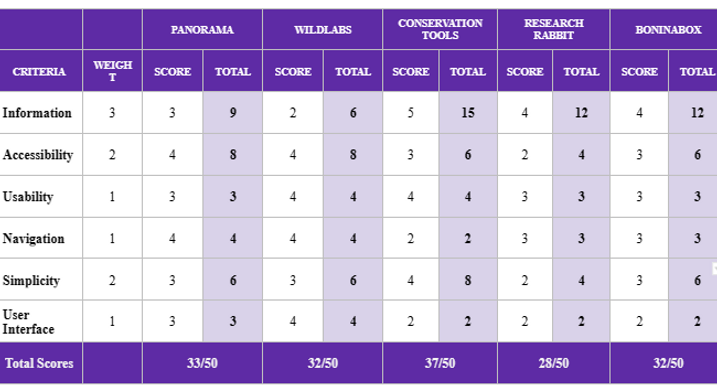
Screenshot 2025-12-27 at 12.41.39 PM.png

Key Insights

Synthesizing interview findings and early testing led to several important shifts in how I understood the problem:

  • Users did not think in academic or disciplinary categories; they searched based on intent (learning, applying, referencing).

  • Dense, text-heavy layouts did more than slow users down—they reduced confidence, especially when topics were unfamiliar.

  • Returning to the same resources was a common workflow, yet the platform provided little support for this behaviour.

  • Unclear social structures discouraged participation, even among users interested in contributing.


These insights re-framed the challenge from organizing information more efficiently to designing for clarity, orientation, and confidence.

Design Strategy & Decisions

Re-framing the Information Architecture

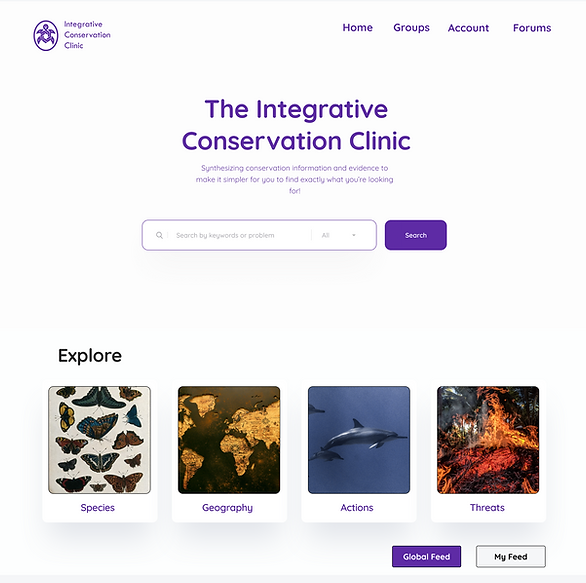
Early content structures reflected disciplinary organization, which aligned with academic norms but conflicted with how users described their workflows. Based on research insights, I worked on restructuring content into four layers that mirrored how users moved from understanding to application:

  • Background — foundational and theoretical context

  • Approach — methods and frameworks

  • Tools — practical, actionable resources

  • Case Studies — real-world applications connecting all three


This structure—referred to in the project as BATs (Background, Approach, Tools)—allowed users to enter at different levels of familiarity and progress naturally toward application.

Trade-off: Some disciplinary specificity was reduced in favor of cross-disciplinary clarity. Testing showed this trade-off helped users explore unfamiliar topics with less hesitation.

Reducing Cognitive Load Through Layout

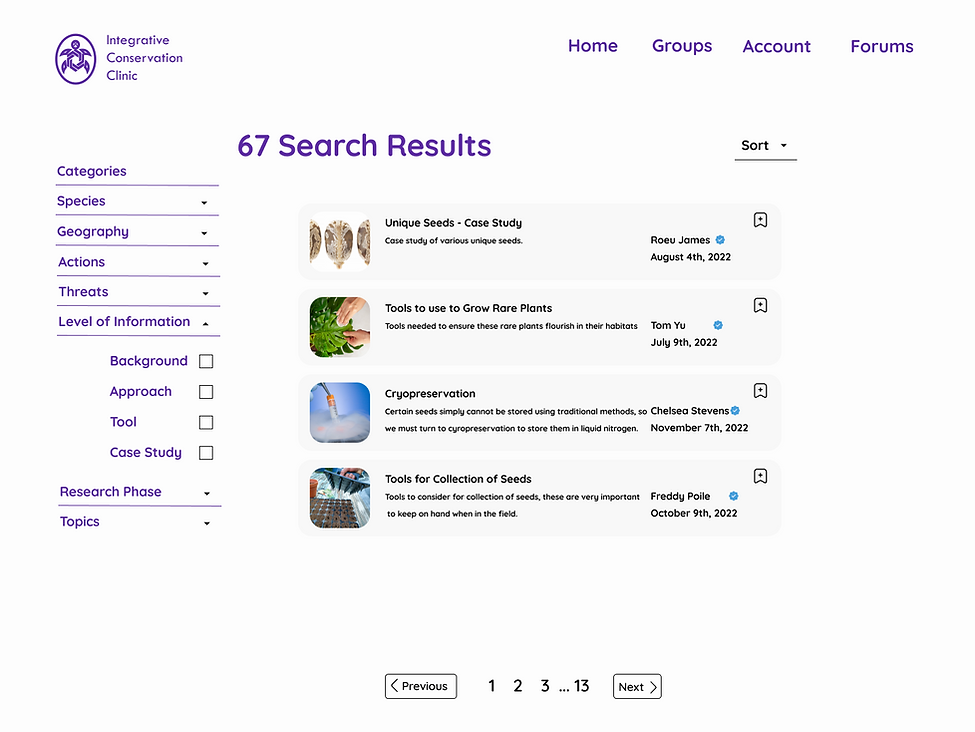
Early prototypes relied on long blocks of text to preserve academic depth, but usability testing showed these layouts caused users to hesitate or disengage. In response, I iterated on layouts to improve scan-ability and visual hierarchy.

Content was broken into clearer sections, with progressive disclosure used to control information density. While this introduced additional interaction steps, later testing showed users preferred this approach to encountering dense pages upfront.

Supporting Reuse and Field-Based Workflows

Interviews revealed that conservation professionals frequently return to the same resources for research, teaching, or fieldwork. To support this behaviour, I worked on clarifying bookmarking interactions and surfacing saved or recently viewed content more prominently for logged-in users.

I also supported design decisions that allowed studies to be printed or saved as PDFs, addressing the realities of remote and field-based work where connectivity may be limited.

Clarifying Community Participation

Usability testing consistently surfaced uncertainty around how users were expected to participate socially. Many participants were unsure whether to post in forums, join groups, or share findings—and often avoided participation entirely to avoid making mistakes.

To reduce this friction, I helped clarify community structures by separating:

  • Groups for focused collaboration

  • Forums for broader discussion


Clearer labelling and entry points helped users form more accurate mental models of where participation belonged.

Prototyping, Testing & Iteration

I conducted think-aloud usability testing on low-fidelity prototypes, tracking user actions, confusion points, and task success. While overall navigation performed well, testing revealed breakdowns in bookmarking clarity, progression between sections, and understanding social features. These findings directly informed subsequent iterations.

I later conducted interactive usability testing across five core tasks, including searching for information, saving content for offline use, and revisiting discussions.

All tasks could be completed within three clicks, though confusion around search behaviour and social participation remained.

To further validate design changes, I planned and conducted A/B testing between prototype iterations. While usability and visual clarity improved, users raised a critical question:

“What makes me use this instead of Google?”

I presented this insight, along with recommendations for differentiation, directly to the client during the final presentation.

Considerations

Accessibility


Accessibility was considered throughout the design process rather than added at the end. I contributed to decisions that reduced text density, strengthened visual hierarchy, allowed access without mandatory account creation, and included options for audio-based content.

These choices reflected both user feedback and the varied environments in which conservation professionals work.

Constraints


The project operated within several constraints. Academic content accuracy could not be altered, multiple disciplines required equal representation, and testing was limited to formative sessions. As a result, design improvements focused on usability and clarity rather than content creation.

Outcome

The final prototype delivered clearer pathways for information discovery, reduced cognitive load, and increased user confidence when exploring unfamiliar topics. Usability testing showed improved navigation success and a clearer understanding of community features, while also identifying areas for continued iteration.


I presented all research findings, design rationale, and recommendations directly to the client in the final presentation.

Results Snapshot

  • 5/5 participants successfully completed core navigation tasks after iteration (up from 3/5 in early testing)

  • Average time-to-find a relevant resource decreased during usability testing

  • Participants reported higher confidence exploring unfamiliar topics in post-test interviews

  • Clearer differentiation between Groups and Forums reduced mis-posting during testing

Reflection & Next Steps


This project reinforced the importance of designing for confidence as much as access, particularly in complex, interdisciplinary domains. It also emphasized the value of grounding decisions in research and validating them through testing rather than assumption.

With additional time, next steps would include longitudinal testing to measure repeat usage, further validation of terminology across disciplines, and deeper personalization based on user behaviour.

bottom of page